
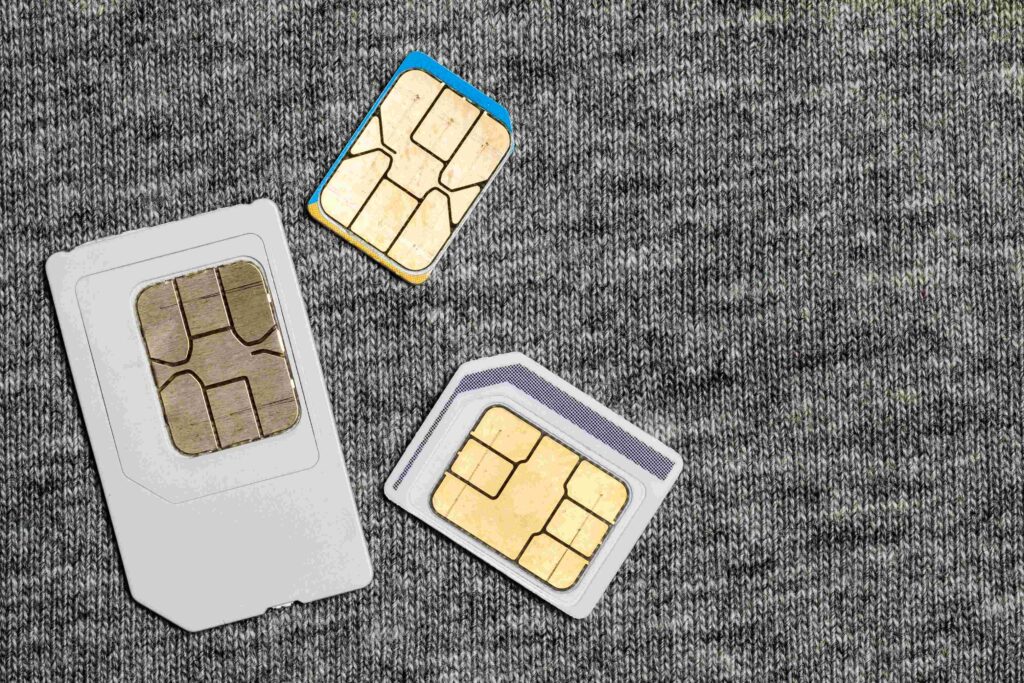
In today’s fast-paced digital world, mobile phones have become indispensable tools, offering everything from social media connectivity to navigation and online shopping. But behind the sleek screens and powerful processors of these devices lies a small, often overlooked component: the SIM card. Though it’s one of the smallest pieces of hardware in your mobile phone, the SIM card plays an essential role in enabling the seamless communication and connectivity that modern smartphones provide.
What is a SIM Card?
A SIM card (Subscriber Identity Module) is a tiny chip that stores essential data needed to access mobile networks. It serves as your device's "identity card" on the network, allowing it to send and receive calls, texts, and data, as well as connect to your carrier’s services.
The SIM card contains a microprocessor and memory, which store various pieces of information:
- Your phone number: This is assigned to the SIM card by the carrier and is linked to your account.
- Subscriber Identity: A unique identifier that links you to your carrier and provides access to their network.
- Encryption keys: These are used to encrypt your communication, making it secure from unauthorized access.
- Service provider information: This includes network settings and features that ensure your phone connects correctly to the carrier’s service.
The Journey of the SIM Card: A Brief History
The concept of the SIM card was introduced in 1991 with the creation of the GSM (Global System for Mobile Communications) standard. Before SIM cards, mobile phones were "locked" to specific networks and could not be easily used with different carriers. The SIM card allowed for more flexibility, as users could simply swap out the SIM card and use their device with a different carrier without losing any of their personal data or contact information.
Over the years, SIM cards have evolved to become more compact, from the early standard SIM size to the micro SIM and nano SIM used in today’s smartphones. This shrinking of size was in response to the ever-decreasing size of mobile phones themselves.
Different Types of SIM Cards
As mobile technology has advanced, so have SIM cards. There are a few different sizes and variations that can be found in devices today:
-
Standard SIM Card: This was the original size, measuring 25mm x 15mm. It’s rarely used in modern smartphones but may still be found in older devices or basic mobile phones.
-
Micro SIM: A smaller version introduced to allow for slimmer, more compact smartphones. It measures 15mm x 12mm.
-
Nano SIM: The smallest SIM card, which measures just 12.3mm x 8.8mm. This is the most common size used in modern smartphones today.
-
eSIM: A newer form of SIM card that is embedded directly into the device. The eSIM allows users to switch between carriers or activate new plans remotely, without needing to physically swap out the SIM card. eSIMs are expected to become more prevalent with the rise of 5G networks and the growth of connected devices like smartwatches and tablets.
The Role of SIM Cards in Mobile Connectivity
The SIM card is responsible for connecting your mobile device to a carrier's network, allowing you to make calls, send texts, and use mobile data. Here’s how it works:
-
Authentication: When you insert your SIM card into a mobile phone and power it on, the device communicates with the carrier’s network. The network uses the IMSI (International Mobile Subscriber Identity), which is stored on the SIM card, to authenticate you as a legitimate user.
-
Voice and Data Access: Once authenticated, the SIM card grants you access to the mobile network, enabling voice calls, text messages, and mobile internet. The SIM card also handles the routing of calls and data to ensure they reach the correct destination.
-
Security: SIM cards also have a critical role in securing communication. They store encryption keys used to protect data and prevent unauthorized access. This means your voice calls, messages, and even internet browsing are kept private.
-
Network Settings: The SIM card also stores some basic network settings, like your carrier’s network codes and preferred roaming list, which helps your phone connect to the right towers while you're on the go, especially when you're traveling internationally.
Global Reach and Flexibility
One of the most significant advantages of SIM cards is the flexibility they offer when traveling internationally. Many travelers opt for local SIM cards to avoid expensive roaming charges, buying a new card that offers better rates for calls and data in the country they’re visiting.
In addition, SIM cards allow for the use of dual SIM devices, which can hold two 大陸數據卡 s at once. This can be especially useful for those who want to maintain a personal phone number while using a separate SIM for work or travel. Dual SIM devices have become increasingly popular in markets like Asia and Europe.
The Future: eSIM and the End of Physical SIM Cards?
The rise of eSIM technology is one of the most exciting developments in the world of SIM cards. Rather than being a physical card that you can remove and replace, an eSIM is embedded directly into the device. This allows users to switch between carriers or activate new service plans without having to deal with physical SIM cards.
Here are some key benefits of eSIMs:
- Flexibility: eSIMs allow users to store multiple carrier profiles on a single device. This is especially useful for people who travel internationally, as they can easily switch to a local carrier’s plan with a few taps, without needing to purchase a new SIM card.
- Space Saving: By eliminating the need for a physical SIM card slot, devices can be designed to be thinner, lighter, and more compact. This is particularly beneficial for wearables like smartwatches, which have limited space.
- Convenience: eSIM technology also makes it easier for users to switch networks remotely, eliminating the need to visit a carrier store or wait for a new SIM card in the mail.
Despite its advantages, eSIM adoption is still in its early stages, and not all devices or carriers support the technology yet. However, as 5G networks expand and the demand for connected devices grows, eSIMs are expected to become more common in the future.
SIM Cards in the Era of 5G
As the world transitions to 5G networks, SIM cards will continue to play an essential role in mobile communication. 5G promises to bring faster speeds, lower latency, and more reliable connections for devices ranging from smartphones to smart cities, self-driving cars, and IoT devices. With the arrival of 5G, SIM cards will need to handle increased data demands and enable more secure, high-speed connections.
eSIMs may become the dominant form of SIM card as 5G evolves, offering flexibility and speed as networks expand. Mobile operators will need to support this transition, providing users with the tools they need to take full advantage of next-generation connectivity.
Conclusion
While we often take them for granted, SIM cards are an essential part of the mobile ecosystem that keeps us connected to the world. Whether it’s making a call, browsing the internet, or sending a text, the SIM card makes it all possible. As mobile networks continue to evolve and new technologies like 5G and eSIM become mainstream, SIM cards will remain the backbone of mobile communication, ensuring we stay connected—no matter where we are.